How I approach a Game Jam and what my Game is about!
I share my best practices I've learned to successfully approach a Game Jam, along with the story behind the game I'm currently working on. More about this game will be covered in my next written Devlogs on this blog. So grab your favourite beverage, lean back and get behind the scenes!
Ludum Dare, again
I woke up early on a nice Saturday morning, managed somehow to get to my PC to check the theme of the Ludum Dare 50 Game Jam: Delay the inevitable.
It was my 9th Ludum Dare, therefore i knew how to cope with the shock of a theme announcement i don't like...

Nah, just kidding, it was much worse 😅
In such situations, my wife always helps me a lot. We usually sit together, drink a coffee (or two) and brainstorm together.
We brainstormed for about half an hour and wrote everything down into a mindmap. I tried the technique I learned from a video by Jonas Tyroller. Basically it is an iterative framework to get to an idea in a couple of steps.
- Start with all interpretations you can come up with of a given topic.
- Choose the one you like most.
- Do step 1 again for the chosen interpretation, until you have your idea. If you get stuck, go one step back in the tree and repeat.
Here you can see our outcome of this framework:

In the beginning our thoughts were about to let the player meet any demand, like let's say... nature instincts, orders or maintaining heat. The other big topic was to keep something alive. As my wife and I like activities like gardening, we thought about keeping plants alive.
The theme is not literally keep something alive, so we were thinking about adding something that is just inevitable - weeds. If you do not take care of your garden, it will probably be overgrown with weeds and this harms your plants that you actually want to grow.

But there must be an incentive to grow plants... Back in the days, we played the game Overcooked a lot.

She was obsessed of this game and forced us to get the maximum amount of stars everywhere, regardless how painful it was 😅. But I have to admit, this game is a lot of fun!
Therefore we thought, the player could run a farm to fulfil orders, like in Overcooked. In addition there is a chance that we can introduce multiplayer to join forces to get the jobs done! That is a pretty nice idea for a game we thought!

With this first inkling of an idea in mind, I decided to give this Ludum Dare a try. I was motivated to do my best to finish a small game in the next 72 hours.
Don't rush to start with it right after you have come up with your idea. Let your idea sink in. I usually wait for about one hour. Do something else, some chores 😅 or go outside for a bit.
Return to your workspace and if you still feel happy with your idea - get started!
Let's Get Started! Define the MVP.
I started by outlining the basic features of the game that supports the Game Idea:
- top-down 2D
- Pixel Art with cute characters
- bright colours
- character(s) to control
The top-down view makes it easier for the player to get an overview of the farm, like most farming games do. The mood for the game should be light hearted and fun. To accomplish this I thought of using Pixel Art with bright colours and cute characters.
Since I am not a big fan of farming games where I only have to use the mouse pointer, I wanted to introduce a character with which the player can move and perform the necessary actions.
The challenge was (and still is) to make the controls work nicely without using the mouse pointer, as there is the chance to implement multiplayer as a couch co-op experience.
The more time went by, the more ideas came into our minds. We really were dreaming of a very nice and big game. At this point I stopped and wrote down the features I need to implement to have a playable game.
- A simple world that renders the farming area.
- A controllable farmer who is able to move around, dig up beds for the plants, plant a seed, water plants, remove weed from plant beds, harvest plants that are ready and return crops to fulfill orders.
- A system that creates orders that the farmer needs to fulfill.
- A system that implements the lifecycle of a plant.
- A system that lets weed grow in plant beds.
Searching for Artwork
I got to make a confession, I am not a big Pixel Art artist (yet 😅). Even though my work in the recent years improved by a lot, I searched for existing art on itch.io to get inspired and found a really good package to start with: Sprout Lands made by Cup Nooble. The art style fits exactly what I wanted to achieve!

I usually go to itch.io and browse through the game assets. My choice depends on what I think I am capable of extending it by myself, if the author won't add more updates.
For me it is very motivating to have some nice assets and art direction from the beginning. But it is not a must have!
If the rules of the Game Jam doesn't allow using other assets, I would consider to use placeholder art (boxes 😅) and make sure that the gameplay is on point. After that I would give my best to polish the art.
It's Time to Code! What Game Engine to use?
I was very happy to find such a nice asset to begin my work with, even my wife liked it a lot. This was quite a moral boost to finally open Godot and getting some code done!
Before I get any further, I want to do a little excurse about the Godot Game Engine and to discuss what my opinion about choosing a Game Engine for a Game Jam is.
Little Excurse: Godot Game Engine

Godot provides a huge set of common tools, so you can just focus on making your game without reinventing the wheel.
Godot is completely free and open-source under the very permissive MIT license. No strings attached, no royalties, nothing. Your game is yours, down to the last line of engine code.
(Godot Engine - Free and open source 2D and 3D game engine)
In my opinion
With Godot one is able to achieve a lot in a reasonable amount of hours. Due to the lean and easy to use IDE (it's below 100 MB!) it doesn't distract one from implementing a game or even an application. In addition the IDE is implemented in the same engine and one is able to extend it with own or available plugins.
What I like the most is the concept of scenes, they are similar to prefabs in Unity (but better imho). Basically everything is a scene, living in a scene tree. There are also resources that serve one as data containers and an event bus out of the box.
I'll cover best practices that allows you to do cool things easily with Godot in my upcoming Devlogs!
As I mentioned Unity...
I used it for years and switched to Godot about 3 years ago. I just wasn't happy with Unity anymore. The IDE felt too clunky and I was more busy with getting and composing nice looking assets from the store than with coding the real game logic 😅. Godot lets me focus more on coding and less on fleshing out the visuals, even though it is possible! The most important part - it helps me to have fun developing games.
I won't do a Unity vs Godot Comparison here
In my life as a game developer I used lots of different game engines. All of them have their strengths, weaknesses and target audience.

Try out different Game Engines that support your game ideas and on the parts of game development you want to focus on. There are a lot of Game Engines out there to enjoy, for example PICO-8 to create tiny games.
Once I made a Game with a Game Engine I barely knew (RPG Maker). If you want to do this, reduce the scope of your game by a lot 🙂.
Let's get back to Coding!
It's already Saturday afternoon - enough of planning and theory, let's get it done!
I started with building the world using Godot's Tilemap with Autotiles. The Sprite I used wasn't exactly build for Autotiles, so I had to make up some tiles on my own to fill in some gaps to get a decent 3x3 Autotiling working.
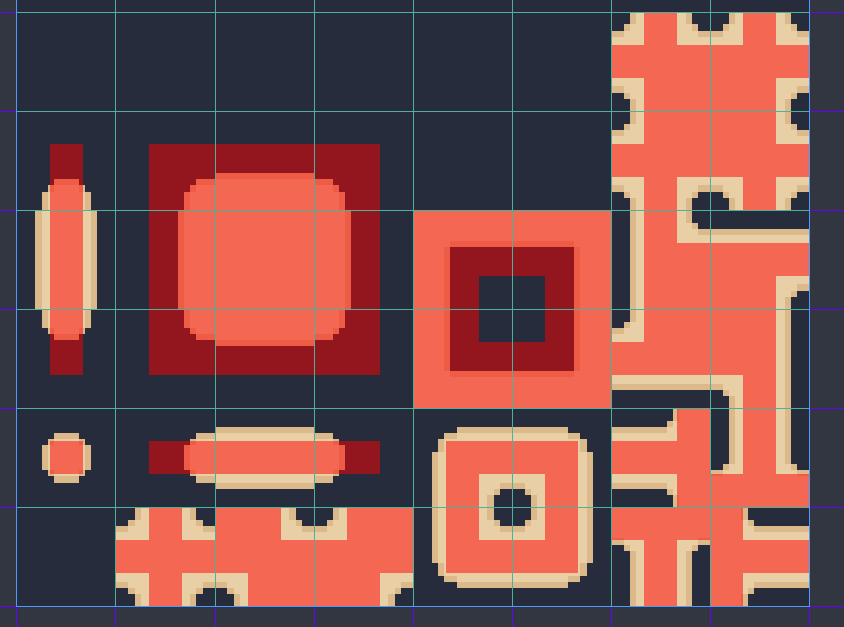
It is not perfect, but it works decent for plant bed patterns the players are going to dig. If you need help with getting the bitmask of Autotiles right, have a look at kidscancode.org or watch this video made by SlushyGames.
I imported all the other very nice assets and composed a small island together.
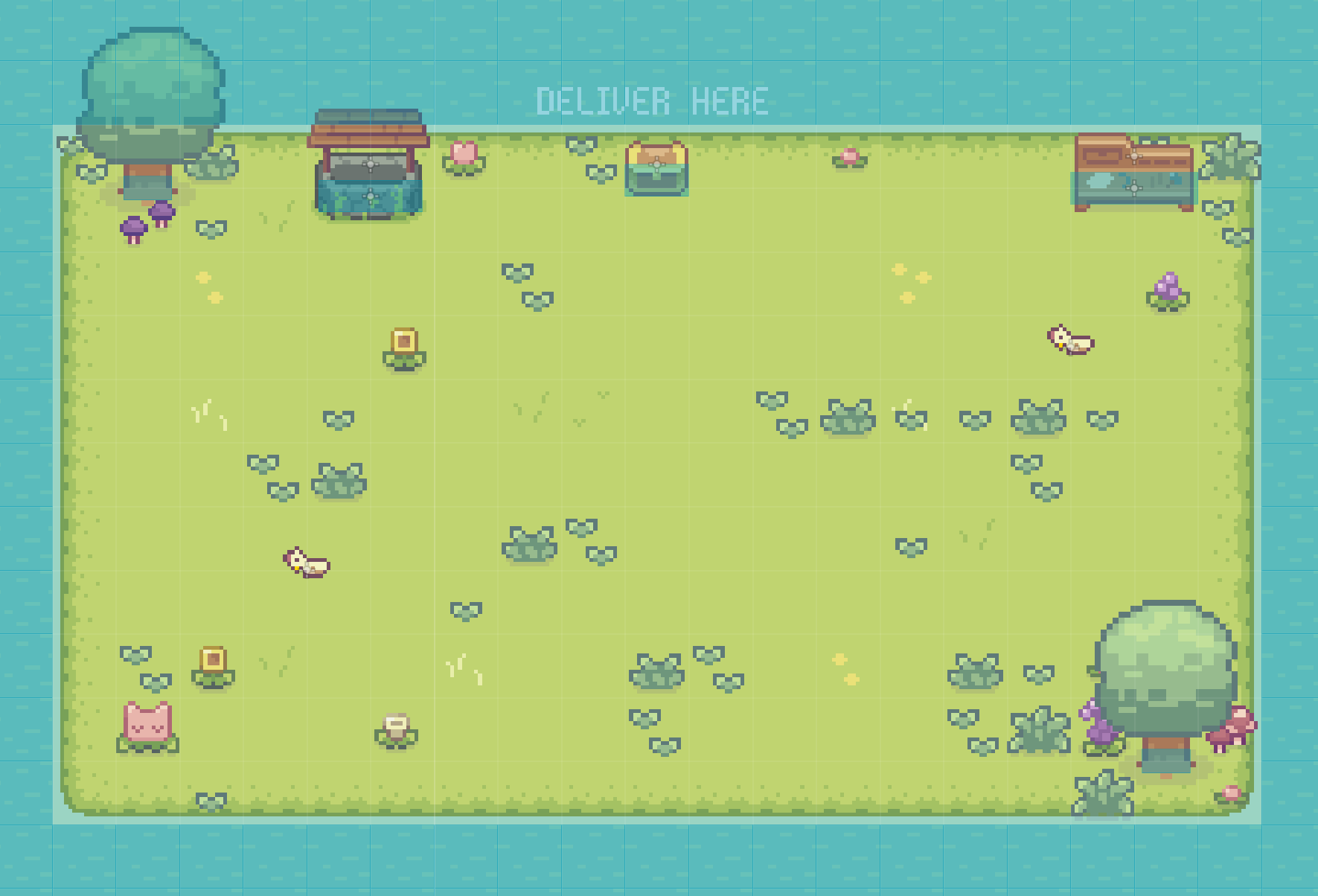
Using an island for the farming area is just an elegant way to have a believable explanation what boundaries the area has. One can expand the island with different facilities to connect the island with the outside world, without the need to render the outside world. It also allows me to have everything fitting into one view, this improves the overview even further and it let's me handle rendering multiple players on one screen much easier.
After that I imported the Character Sprite and setup the existing animations. I was very happy that the animations provided are sufficient to my scope I setup in the MVP 🙂.

You can see that I added more tracks to each animation. I use tracks for calling functions to trigger actions in the code (e.g. finish_watering()) and to play sound effects (e.g. the steps) just in the right moment. Afterwards I implemented the movement and bound actions for digging, weeding and watering to the same (keyboard) key.
The decision to bind every action to the same key was a tough one. Earlier, I had bound each action to a separate key, but during playtesting I felt the controls weren't just right. In the next chapter I'll write a short paragraph about my Idea to add Items for each action, but time was too short to get it right - a compromise was necessary.
Make the controls as easy as possible. If you have more complex gameplay systems, build an entertaining tutorial. Otherwhise your players won't see everything of your game and that means your hours of effort can't be witnessed.
Next I implemented the plant bed's lifecycle. As mentioned earlier our farmer needs to dig out the plant bed first and plant a seed. Our farmer needs to water it and keep the plant bed clean from weeds.
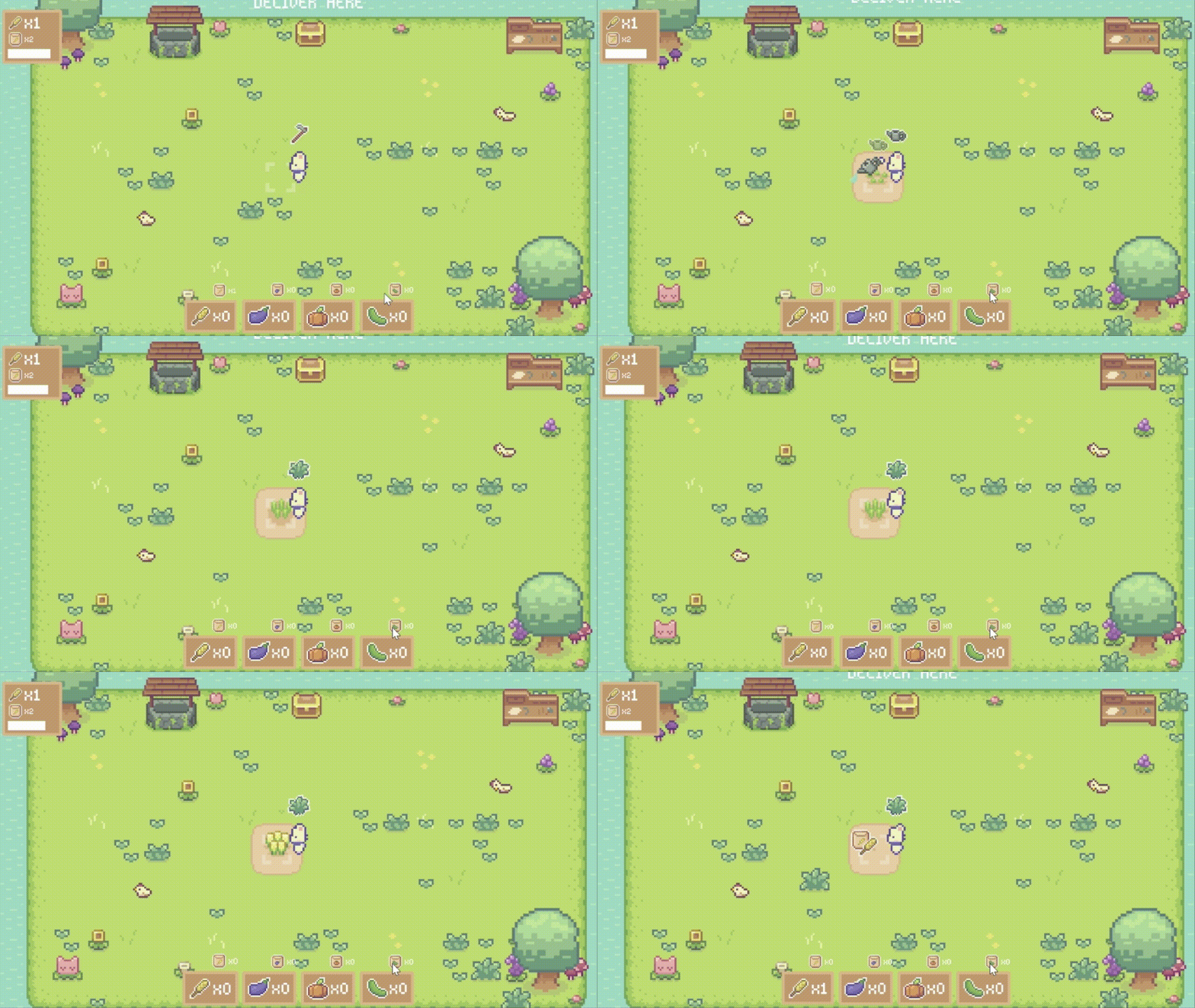
Speaking of weeds, I thought of randomly spawning weeds over the planting bed. It sounds cool and would add variety to each planting bed. Unfortunately it has some issues as for example it could happen that the weeds are rendered behind the plant in positions that just do not make sense. It could happen that the player is not able to see the weeds at all and this would not support the idea of the gameplay. Therefore I decided to define fixed areas in which the weeds can grow.

I added a timer, after each tick it switches the visibility of a random weed to visible. The short gif below shows it in full motion.
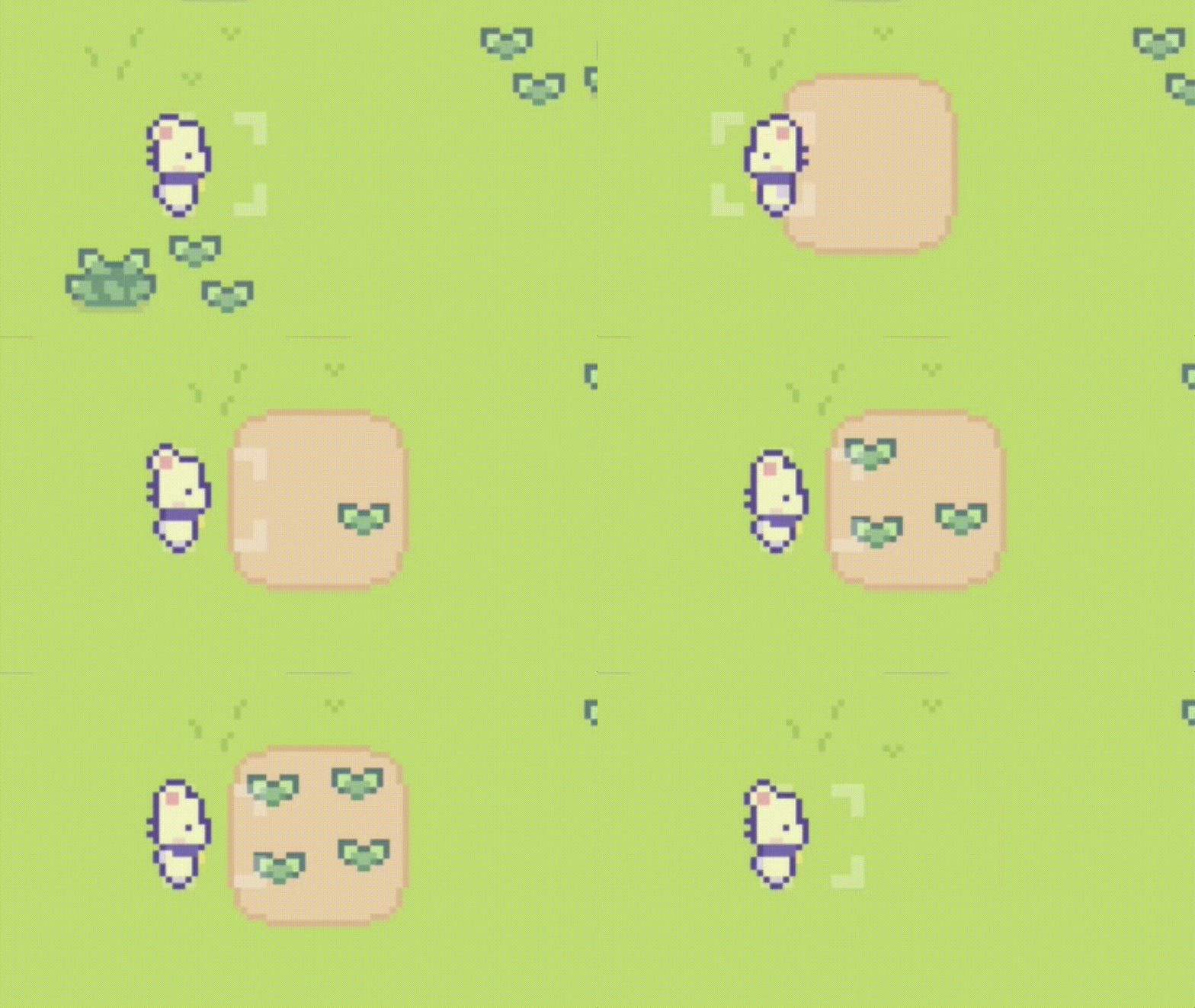
Sure, there are ways to prevent growing weeds in unlikely spots. I could define spawning areas that aren't fixed positions, but rather rectangle areas and randomize the position a bit inside of these. But during a Game Jam you need to make compromises.
Make Compromises
Speaking of Compromises 🙂, developing a game for a Game Jam can't be without it, imho. Due to the short time frames I got to go some shortcuts that might hurt me in the future, if I decide to develop the game further. But that is not decided in the timeframe of a Game Jam. As mentioned above, I always wait for the resonance, the feedback from the community and friends.
Reduced Inventory System to the bare minimum
Besides the above compromise, I took shortcuts implementing the inventory. During development I thought of making a full fletched inventory system with a generic item type that I can use, a decent drag and drop system and so on and so forth...
I figured that this would cost time that I rather want to spend on making sure the game is fun to play and self explanatory. Therefore I thought of the bare minimum I need to implement. I asked myself what kind of items do I really have and are important to render in the game UI? Right, only seeds and fruits that were harvested. This leads to the conclusion that I can focus on coding and designing the UI accordingly.
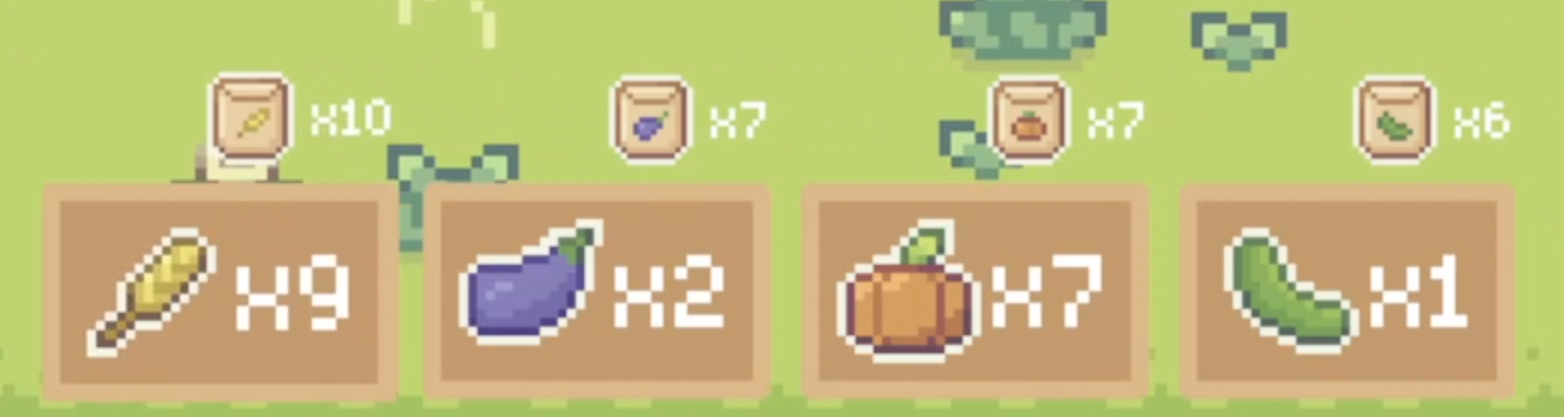
The inventory UI consists of rendering the fruit type and the amount. Above I render the type and amount of seeds. I decided to render the fruits really big as the player needs to quickly get the information if there are enough fruits to fulfil an ongoing order.
Implemented an easy to maintain and to control Order System
After the farmer was able to carry items, I decided to implement the system that generates orders. In the beginning I was all about making it generic and generated automatically. But time was ticking and after a short break I decided to just get it done.
Therefore I added one simple array that holds all orders. The first two items define the plant type and the second one the amount the player needs to harvest. Following items define the amount of rewards per plant type in form of seeds.
# planned_order: PlantType, amount, time, xWheat, xAubergine, xPumpkin, xCucumber

var planned_orders: Array = [
    [Enums.PlantType.WHEAT, 1, 85, 2, 0, 0, 0],
    [Enums.PlantType.WHEAT, 2, 80, 2, 1, 0, 0],
    [Enums.PlantType.AUBERGINE, 1, 90, 1, 2, 0, 0],
    [Enums.PlantType.AUBERGINE, 2, 90, 0, 2, 1, 0],
    [Enums.PlantType.PUMPKIN, 1, 70, 0, 2, 2, 1],
    [Enums.PlantType.CUCUMBER, 1, 70, 1, 0, 0, 2],
    [Enums.PlantType.WHEAT, 4, 95, 2, 0, 2, 2],
    [Enums.PlantType.AUBERGINE, 3, 90, 0, 0, 2, 1],
    [Enums.PlantType.PUMPKIN, 2, 80, 3, 0, 0, 0],
    [Enums.PlantType.WHEAT, 5, 70, 2, 0, 0, 0]
]
This solution has the advantage, besides the obvious that it was simple and fast to implement, to give me full control of the first steps players are going to have in the game. I can start easy and introduce new plant types step by step. So it was not only a decision for getting it just done fast, but also effected the way I can design the gameplay as well!
Only 3 hours left... Don't forget to plan to playtest and publish!
Basically the game was done. The last piece of the puzzle was to implement a way to return the fruits for the order. I just added a chest with a sign above to indicate that the player needs to return at this place.

I looked at my watch and noticed that there are only 3 hours left. Plenty of time to add more nice little things that improve the game look and feel! - one might think...
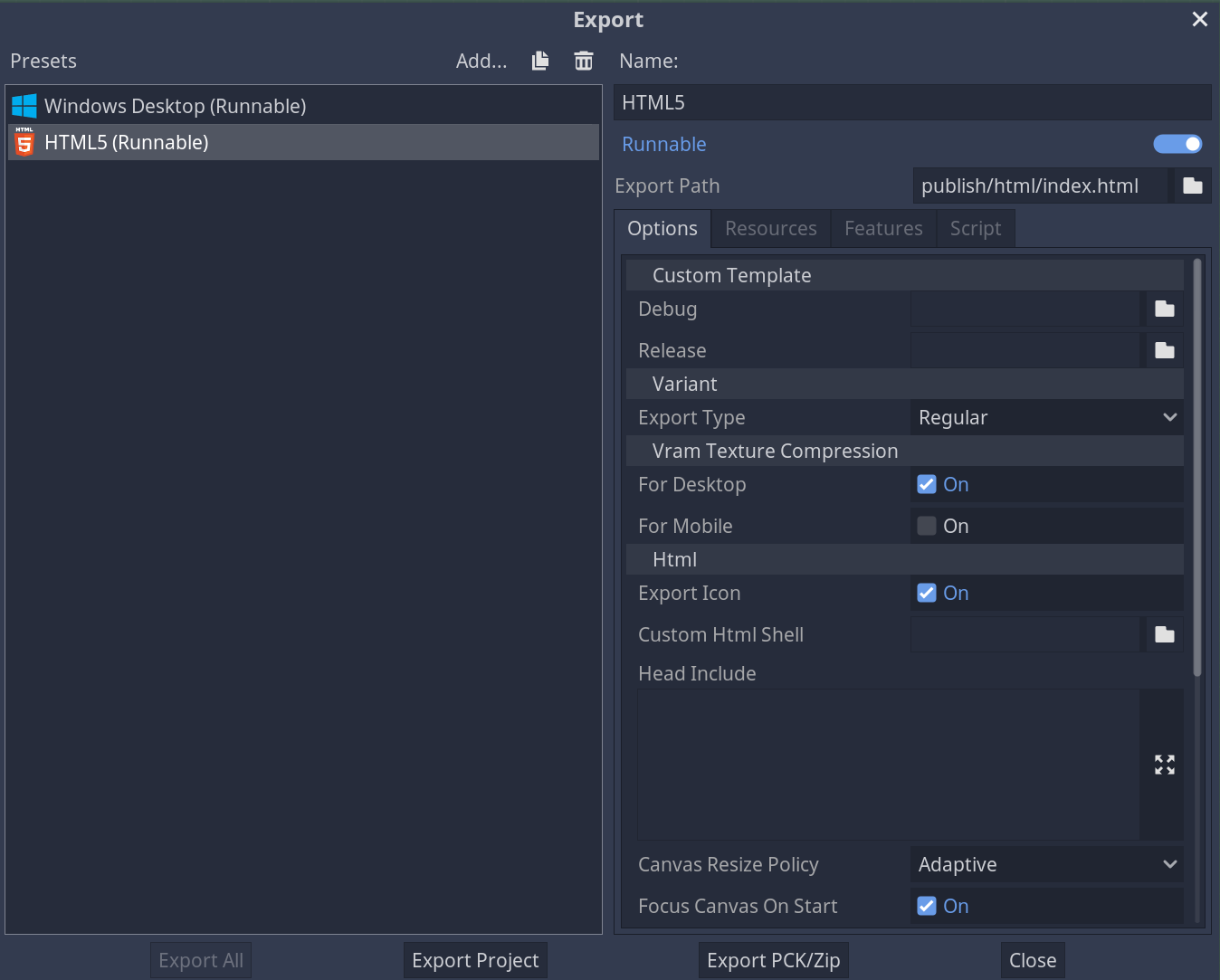
Before I improved my game, I wanted to make sure I have a build that can be shipped. I always go for a build that is ready to be played in the Webbrowser.
It lowers the effort for potential players to play your game.
Thankfully in Godot it works pretty easy and fast to create such a build via the HTML5 export template.
Imagine you are a player of your game that has never seen it before. Would you get the controls and gameplay? Ask a friend or a family member to play it and listen closely.
If you do builds for the Webbrowser, e.g. a WebGL build, expect that the game can look and behave differently from your playtest within the IDE of the Game Engine! Therefore make a build as soon as possible and test it.
Add Sounds and Music!
After I made sure that there is a build ready and there are no game breaking bugs anymore, I wanted to add sound effects.
Sound effects are quite important for the game feel and immersion.
So I went to https://sfxr.me/ and played for quite some time with the sliders to get all the sound effects I needed. For music I looked into my library of bought music (there are quite often deals on Humble Bundle) or I google them. I always take a closer look at the license!
Further steps to do
Close to the end I did the following steps:
- uploaded my game: https://marinwin.itch.io/my-happy-weedy-farm
- designed a proper Cover Image
- created a nice text on the game page and itch.io
- took and uploaded Screenshots
- recorded a little gif to show gameplay
These things are, at least to me, mandatory to get noticed in a positive way by the audience. Sure, you make the game first for yourself, because it's fun. But I think it would be even more fun to get as much feedback as possible. Therefore you need to present the game as best as possible.
It's done, decompress
Celebrate and rejoice after the publish. It feels very good, enjoy the moment!
Pause and (try to) do nothing the next day. Look at other contributions and have fun. Don't keep coding right away. That is not healthy and you get lost. Wait for feedback first and then act. Therefore be active in the community as well.
Thank you.
If you took your time to read everything I honestly thank you. I sincerely hope you learned something and enjoyed reading this article 🙂.
Get noticed when I publish new Articles.
If you are interested in either following my Game My Happy Weedy Farm or in game development in general, I kindly ask you to subscribe to this blog. You will get an E-Mail after a new blog article has been published. No Spam, I promise 🙂.
Have a wonderful day! Cheers,
