How I use Godot's Resources to make Development easier.
Today I'll show you what Resources in Godot are and how you can use them to write less code but achieve more in less time.
There will be no dry theory to read 😅. Follow my story of how I went from my spaghetti 🍝 code for the inventory system to a clean ☀️ and extensible designed system.
So grab your favourite beverage, lean back, and take a look behind the scenes!
The Awakening after the Ludum Dare
Since I participated in the recent Ludum Dare, I am motivated to explore the possibilities of my Game further.
If you don't know it yet, it's about playing a farmer cat. You build a farm to provide food for your friends and need to overcome lots of challenges in different levels to get the jobs done. Alone or with friends.
The catch is that it is much more arcade style than a simulation. Think about Stardew Valley and Overcooked would have a baby 😅. This is my goal.


The first thing I wanted to get sorted out, was a proper inventory system. In the Jam version of the game there are no other types of items other than seeds or fruits. So there is no real base to build upon that...

This needed to be changed as I have ideas to use the inventory to introduce new game mechanics later. For example the players can buy a better hoe to get rid of the weed faster, or to install sprinkler systems to water the plants automatically. Each level is going to have different challenges and therefore needs different tools and approaches to meet them.

Define your Domain
Before I went on and refactored the existing inventory system, I sat down and draw my domain onto a whiteboard, of the world I am building. It helps me, already at the beginning, to deal intensively with my ideas and the world I want to bring to life.
This step during designing a game is really important for me, it came short during the Game Jam 😕. I want to think about each object that lives in the world and how they are connected to each other.

Most of the domain objects above are likely to shells. If one changes the property values, one could render different objects onto the screen.
For example in case of the plant type. Change the name, the fruit, the seed and the animationframes for growing... There you go, you have a different plant and I need a lot of them😅.
Is Inheritance always the best Way?
There are different approaches to instantiate different objects of the same base type, but with different specifications. You could implement a class PlantType, as a base class, and then add more classes which inherit said class.
Transferred to Godot, you would create a scene for the PlantType and add scenes, which inherit the PlantType Scene, for each type of plant you would like to implement.
Each scene takes care of rendering the object, implementing interactions between other objects and the players, defines behaviours and so on and so forth. Or...

Resources are powerful!
Sure, using inheritance and many scenes for each plant or any other specification of a base type is a decent approach. But what happens, if you need different presentations of basically the same object? Let's have a look at the following picture.

I added this picture to show you that basically the same object, a wheat fruit, can be presented in different ways. If I would implement these different presentations with an inherited scene each, I had to define the name and the picture to be used as the graphical representation in each scene.
If I would like to change just a tiny bit, like using a different name, I would need to do that in multiple places and probably miss one or do it inconsistently.

Sure I could use a single file to define these things, e.g. a JSON, and initialize the values for each scene. But there is an even better way to do this: Using Godot's Resources!
Nodes give you functionality: they draw sprites, 3D models, simulate physics, arrange user interfaces, etc. Resources are data containers. They don't do anything on their own: instead, nodes use the data contained in resources.
- from Godot's Documentation
The nice thing is, you can attach a class to a Resource. The class defines the properties of the Resource. You can go one step further and add methods as well.
These capabilities enable you to not only use a Resource for a simple data container, but for defining a domain object even.
You can even use inheritance to define base classes for Resources. For example an Item base class. Each specification of an Item can inherit it, define it's properties and implement behaviour.
One application would be to implement a method that defines what happens, if the player use the item.
In addition, Godot supports you with a nice GUI to define your object's data.

Let's get it done.
With this concept in mind, I designed my Items as the following.
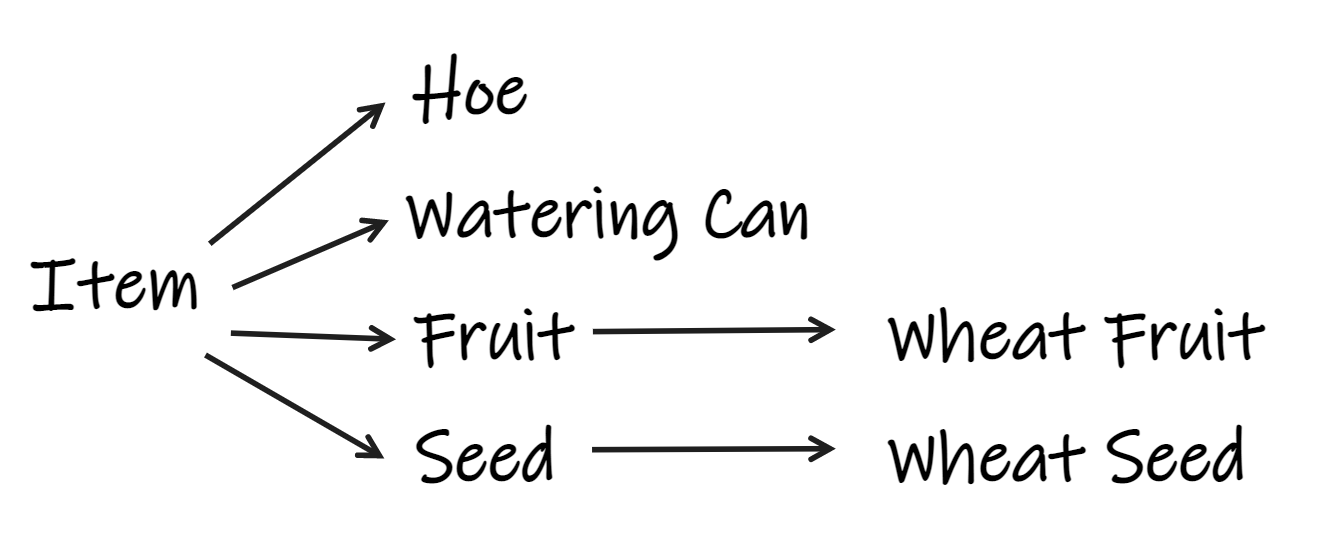
There is one Item class that defines basic properties and a method called use(). It defines what should happen if the item is used. For example in case of the Watering Can the next plant bed (patch) to the player gets watered.
extends Resource
class_name Item

# name of item
export(String) var name: String

# number of frame in all items texture
export(int) var frame_in_texture: int

# short text about the item
export(String) var description: String

export(int) var stack_amount: int = 1

func use(player, inventory_item):
	pass
In order to share code for similar items, I use inheritance. This led me to implement base classes for fruits and one for seeds. Below you can see an example for a specification of a seed item.

If you compare this design concept with the picture about my domain above, you can see that I can design my world exactly as I wanted. It's clean and not mixed up with code for presentation or interaction. It is only about defining the object and it's behaviours.
The Inventory UI
For the inventory I used Godot's Grid implementation. It provides everything right out of the box, what I need to layout the inventory UI.
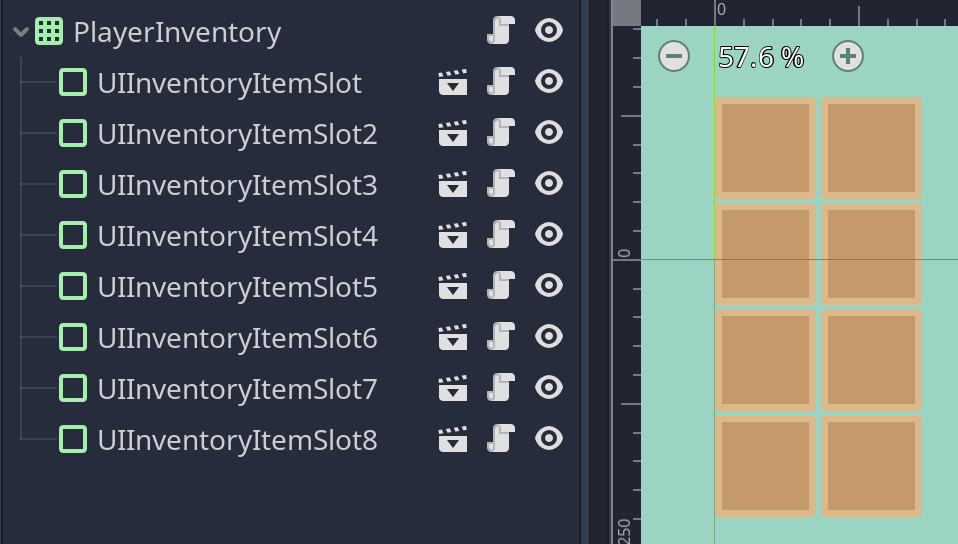
The children of the Grid are InventoryItemSlots. It is a panel which I designed via the integrated Theme Designer. A slot has methods to add or remove an InventoryItem.
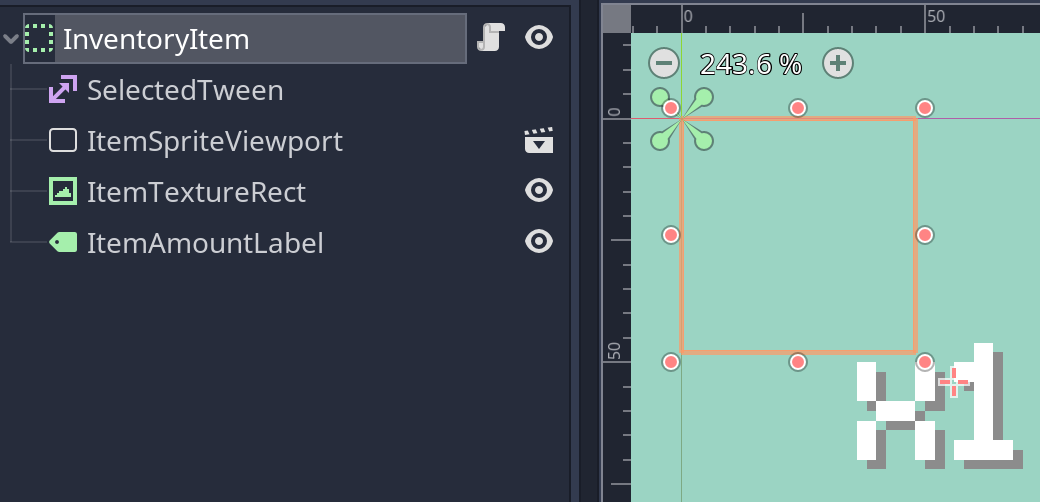
An InventoryItem holds the amount and a reference to the corresponding item. In order to let the player use an item, the placeholder just calls the use() method of the item.
As Godot unfortunately is not able to provide the IDE a hint for the type of Resource I'd like to reference specifically, nor allowed me to use it as the type. Therefore, I used a workaround with a custom setget method.
extends Node
class_name InventoryItem

# Workaround as I can't use the Item class, which inherits Resource
export(Resource) var item_res: Resource setget set_item_res
var item: Item
export(int) var amount: int = 1

func set_item_res(value: Resource):
	item_res = value
	item = item_res as Item

func use(player):
	item.use(player, self)
As each item has the number of the frame in the sprite that contains all items, I can render the right frame for a specific item.
To render a specific frame of a sprite into an UI control, I needed to add a Viewport that renders the sprite in it's own world with the right frame selected.
func _ready():
    $ItemTextureRect.texture = $ItemSpriteViewport.get_texture()
    $ItemSpriteViewport/Sprite.frame = inventory_item.item.frame_in_texture
Each Player needs it's own Inventory
The UI is responsible for rendering the information and handling the interaction with the player. But it is not responsible for owning the inventory and items, which means to be the single source of truth and is allowed to update items a player has.

Therefore I added another node to the Player Scene: InventoryItems. It's responsible for holding the items a player has. If I'd like to give the player some items right from the start, I add nodes of type InventoryItem with a reference to an Item Resource I want and define the amount.

The player class owns methods to add or to remove items if needed, for example if the player picks up an item.
func pickup_item(item):
    # if item is stackable add it
    var added_to_existing_inventory_item = false
    if item.stack_amount > 1:
        # first find matching item in inventory
        for inventory_item in inventory_items.get_children():
            if inventory_item.item.name == item.name and
                inventory_item.amount < inventory_item.item.stack_amount:
                inventory_item.amount += 1
                added_to_existing_inventory_item = true
                emit_signal(
                    "inventory_item_amount_updated",
                    inventory_item
                )
                break

    if not added_to_existing_inventory_item:
        var inventory_item = inventory_item_scene.instance()
        inventory_item.item_res = item
        inventory_items.add_child(inventory_item)
        emit_signal("inventory_item_added", inventory_item)

    $PickupItemAudioStreamPlayer2D.play()
I am using signals to tell the Inventory UI to update it's items. There is no need to send the id of the player with the event, as the corresponding Inventory UI connects only to one player to listen for events.
Conclusion and further Areas of Application
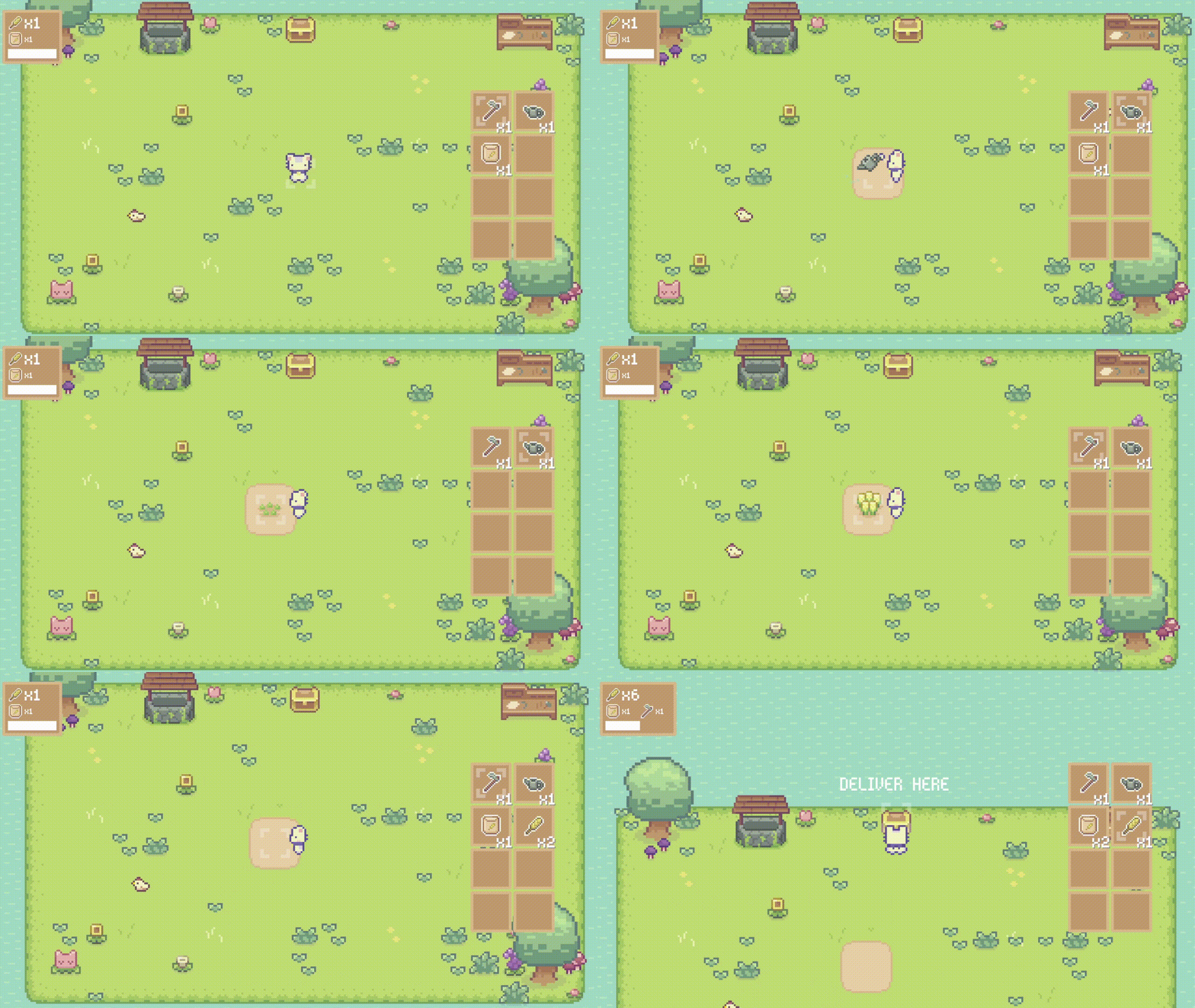
Above you see a new gameplay shot of the current state of the game.
I took the chance to overhaul the controls as well. I figured that I'd like to have items the player needs to use in order to get the jobs done. The player can move the item selector with Q/E and use the item with F.
It feels more natural as it allows the player to be in full control, which is one of the key principles for a nice user experience.
This article got quite long, again 😅. Therefore I figured, I'd like to show you in the next article, how I used the capabilities of resources and nodes together in a different application. It allowed me to build a nice system for orders that offers me the ability to design my orders for levels with ease.
Thank you.
If you took your time to read everything I honestly thank you. I sincerely hope you learned something and enjoyed reading this article 🙂.
Get noticed when I publish new Articles.
If you are interested in either following my Game My Happy Weedy Farm or in game development in general, I kindly ask you to subscribe to this blog. You will get an E-Mail after a new blog article has been published. No Spam, I promise 🙂.
Have a wonderful day! Cheers,
