Writing less Code to create Levels faster? Sounds good.
Hi there!
This time I want to talk about my motivation to revamp my ordering system using the concept I explained in my last article. Of course I will show you what and how I did it 😊.
As written above, I am not only writing about another showcase, but also to explain my motivations for taking the time to implement good solutions that are easy to use in further development and content creation.
So grab your favourite beverage, lean back, and take a look behind the scenes of my game!
Why I think you should take more time for implementation details.
In my Opinion, implementing features and creating content (e.g. composing new levels) may seem like two unrelated things.
But new features enable new content. Also, if you have ideas for new content, you may need to implement new features. They need each other.

Let's say there is a new feature that allows you to design missions for a level.
To design those missions, there are lots of complicated steps, at different locations inside of the game editor to do. Maybe even writing code is necessary.
It's tedious and time consuming, you are getting stressed and less motivated to build content using it.
This is not ideal for creating great content.
Win. Win.
Investigate how you can simplify using your new feature for creating content and invest the time to implement it. If you work in a team, ask your colleague(s) for feedback.
If you develop a game on your own or even in a smaller team, you are maybe in both roles: The one who is developing the feature and the one who is applying it.
This makes it even more important to take care of the described challenge above.
Furthermore, your community will love it, as you can provide (new) content even faster. You provide it even with higher quality, because you have fun creating!

My own extra Mile I need to go.
Let's revisit the way I defined the orders for the first level the player needs to fulfil. Back then, I was in a hurry and needed a very simple but efficient solution.
The code below shows a rather illegible array:
var current_order_number:int = 0
# planned_order: PlantType, amount, time for delivery, xWheat, xAubergine, xPumpkin, xCucumber
var planned_orders: Array = [\
[Enums.PlantType.WHEAT, 1, 85, 2, 0, 0, 0],\
[Enums.PlantType.WHEAT, 2, 80, 2, 1, 0, 0],\
[Enums.PlantType.AUBERGINE, 1, 90, 1, 2, 0, 0],\
[Enums.PlantType.AUBERGINE, 2, 90, 0, 2, 1, 0],\
[Enums.PlantType.PUMPKIN, 1, 70, 0, 2, 2, 1],\
[Enums.PlantType.CUCUMBER, 1, 70, 1, 0, 0, 2],\
[Enums.PlantType.WHEAT, 4, 95, 2, 0, 2, 2],\
[Enums.PlantType.AUBERGINE, 3, 90, 0, 0, 2, 1],\
[Enums.PlantType.PUMPKIN, 2, 80, 3, 0, 0, 0],\
[Enums.PlantType.WHEAT, 5, 70, 2, 0, 0, 0]]
The solution is simple, but it can't be extended without lots of changes in the code. Let's say one want to add another fruit or to go "crazy", a different item like a better Watering Can as a reward.
That's simply not possible, because the order system only knows of specific fruits and seeds!
Thankfully, in my last article I was able to introduce the capability to create and use items of any kind. So theoretically I can design items the player needs to deliver and gets rewarded with.

But the order system doesn't know anything of items and is lacking of comfort to create different orders for the levels I want to build.
One still has to write code and would need to know what element in the array correspond to which item.

Applying the concept I've learned.
Let's get started: What do I need for managing and designing one order?
- Right, a scene for a single order. I know, it's not a 1000IQ move 😅, but it will get better 😉.
To solve this challenge, let's remember one of the takeaways of my last article:
With that concept in mind, I designed the order scene as the following:

With these variables I am able to construct an order with any item the player needs to deliver and to reward said player with any items I'd like.
Furthermore, I don't need to write code for that, I can just drag and drop the corresponding resource for any item into the fields and define the other variables directly in the UI.
This feels much better!

Let's go further, we are getting close to get it done!
Next step is to revisit the Orders scene that manages what order is next and to fulfil active orders if the players returns items to the chest.
Instead of using another illegible and unwieldy array, why not just benefit from the tree structure that comes with Godot for free? Therefore I added another node as a child to the orders scene: PlannedOrders.

Now I can instantiate the order scene and add as much orders as I would like to with ease.
The orders' script is taking care of retrieving the orders one after the other and renders it to the screen.
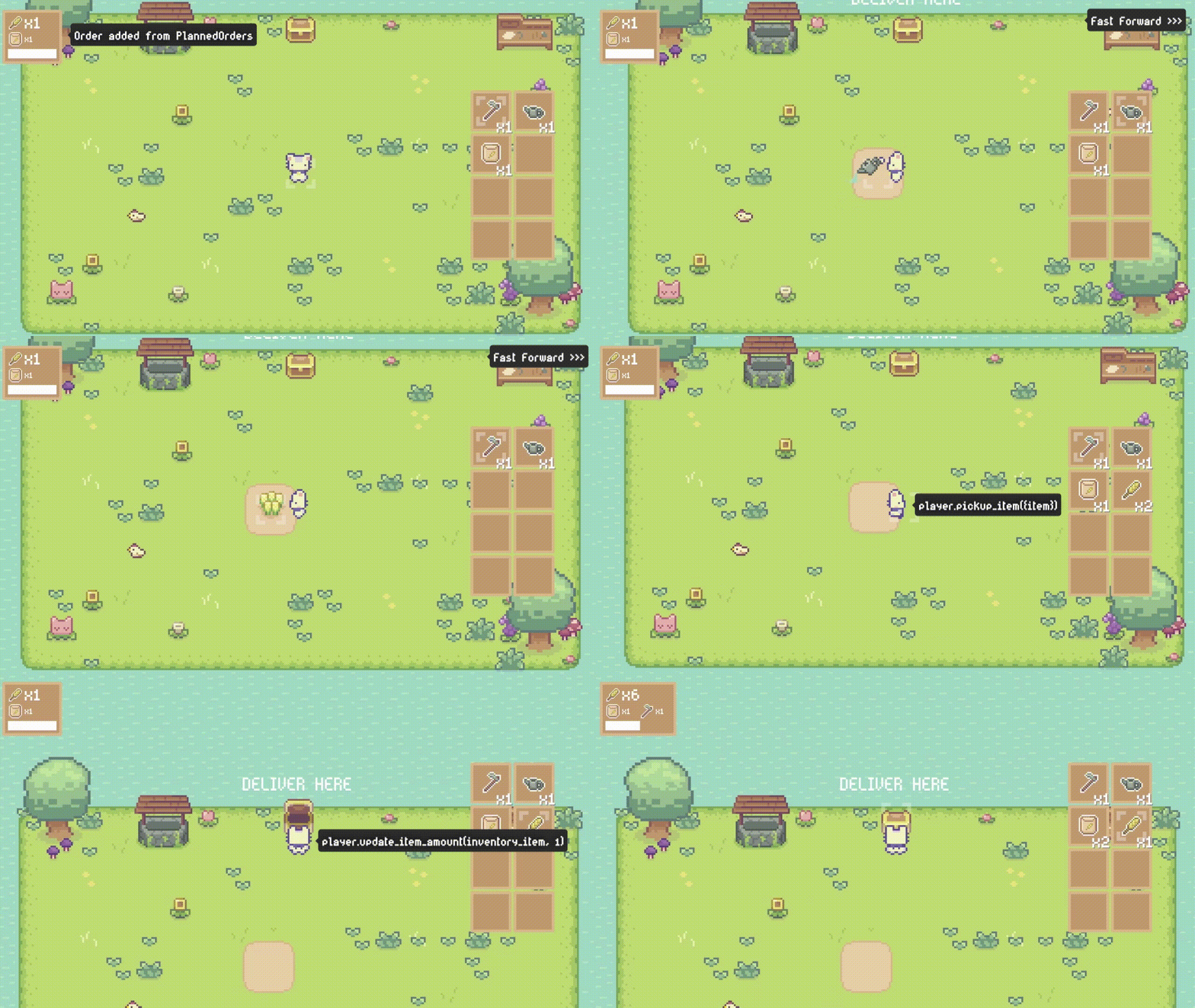
If the player returns with items to the chest, the orders' script checks which active orders can be fulfilled and calls for each fulfilled order the deliver () method.
It rewards the player with the items defined in the corresponding order with the help of the same method as if the player walks over a Pickupable Item.
func deliver(player):
    for reward in rewards.get_children():
        for i in reward.amount:
            player.pickup_item(reward.reward_item)

    get_parent().remove_child(self)
    call_deferred("queue_free")
I prepared a short gameplay video of delivering an order with explanations that sketch out what is going on behind the scenes.
Wrap it up.
As you may have noticed, I like the concept about using Godot's resources quite a lot 😅. With this article I shared one more example of it.
I also wanted to explain my motivation to always strive to not only develop a new feature, but also to think about how I can easily apply it to my game.
If I implement a feature which is really hard to apply, it is just not fun and demotivates me to use it.
The more things are demotivating, development of any game will suffer.
Make sure your game development journey is fun. Good implementation concepts are helpful here.
Therefore keep your eyes open for good publishers who publish these concepts and share their experiences of applying them.

To help you get in touch with publishers other than me, I plan to write an article about my favourite game development publishers.
What's up in the next Weeks...
In the upcoming weeks I want to finish my first playable level.
I want to use it to explore the gameplay even a bit more. I am thinking of introducing new items that you can use for your farm. It will probably introduce new fun mechanics as well 😊.
In addition, I want to explore ideas for creating crazy levels which don't intend to make your life easier, but more challenging 😬.
Think of rivers you need to cross in order to get to your plants 💦.
Or I am going to add animals that want to steal your plants... 🤡

The first level I want to build will represent the core ideas of gameplay I have in mind.
It will be a vertical slice you can play for free.
Therefore I am going to update the blog during the next weeks quite often with little and bigger accomplishments, enriched with small gameplay videos 🎬.

As soon as I stumble across a concept or an 💡 that improves game development in any way, I will share it with you as well!
Thank you.
If you took your time to read everything I honestly thank you. I sincerely hope you learned something and enjoyed reading this article 🙂.
Get noticed when I publish new Articles.
If you are interested in either following my Game My Happy Weedy Farm or in game development in general, I kindly ask you to subscribe to this blog. You will get an E-Mail after a new blog article has been published. No Spam, I promise 🙂.
Have a wonderful day! Cheers,
